
GoldenStar Mobile App
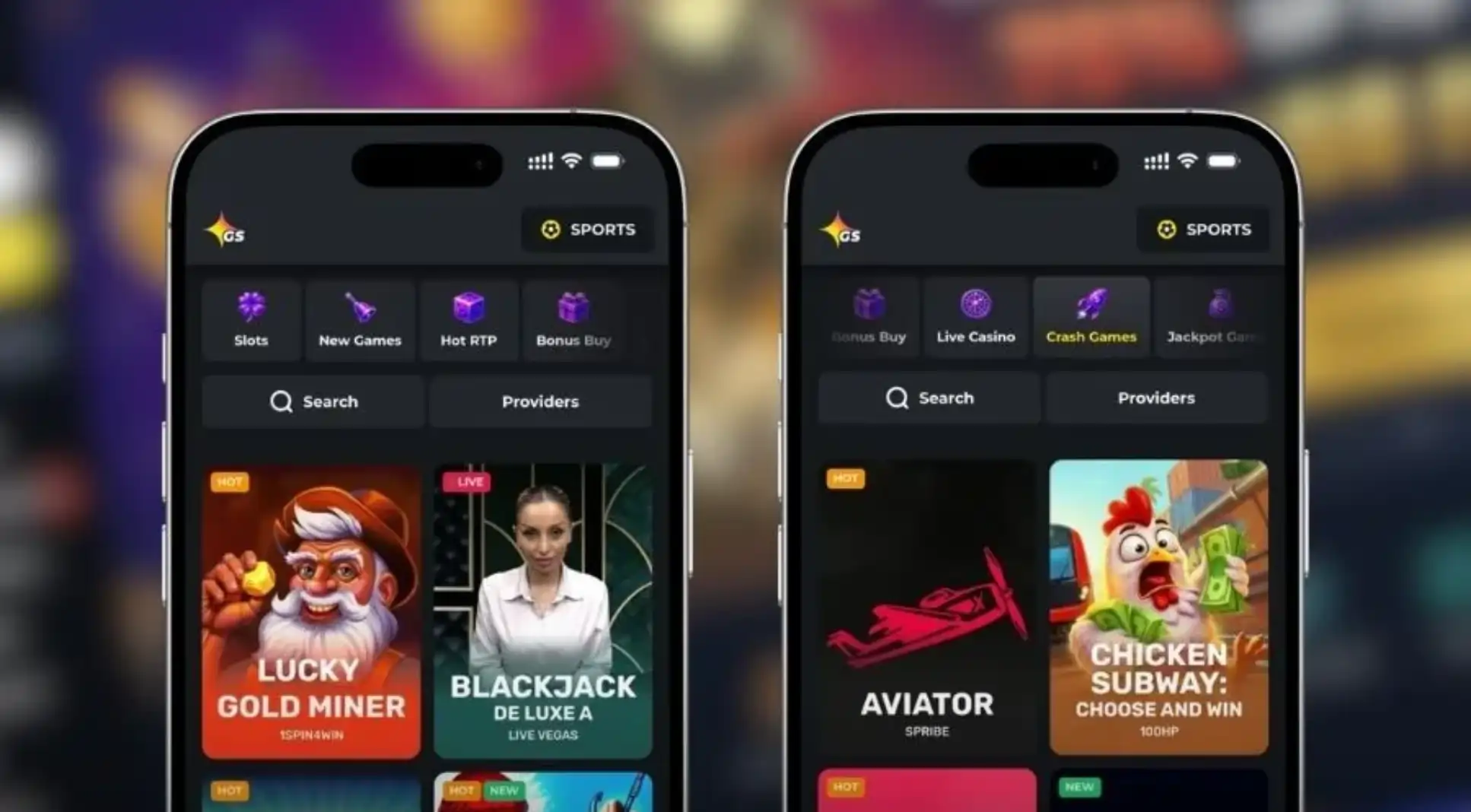

At GoldenStar, we know that modern players want their favorite games available wherever they go, and that's exactly why we built our mobile app. Whether you're waiting for a coffee, commuting, or simply relaxing on the couch, our Golden Star app puts the entire casino in your pocket. No downloads through third-party stores, no confusing setup - just a smooth, fast way to enjoy slots, live casino games, and jackpots from your phone or tablet.
In this guide, we'll walk you through how to install our app on Android and iOS, show you how to log in and grab your welcome bonus, and explain what makes the GoldenStar mobile experience stand out from other online casinos.
What Makes Our App Worth Downloading
We've built the Golden Star app around speed and convenience. Pages load quickly even on slower mobile connections, navigation is intuitive with clearly organized categories, and the whole interface is optimized for touchscreens so you're never fighting with tiny buttons or awkward menus.
- Smooth performance on both Android and iOS devices
- Full access to our slots, live casino, and jackpot sections
- Same account, balance, and bonus progress as on desktop
- Push notifications for promotions and tournament updates
- Biometric login support on compatible devices
Getting the GoldenStar App on Your Device
We've designed our app installation process to be quick and hassle-free, regardless of which operating system you use. Since GoldenStar Casino app isn't distributed through the Google Play Store or Apple App Store due to gambling policies, we host the installable version directly on our website.
For Android Users
- Visit goldenstar-casino.com from your Android browser
- Look for the app download banner or icon in the menu
- Allow installation from unknown sources in your device settings if prompted
- Download the APK file and open it to install
- Launch the app and log in or create your account
For iOS Users
- Open Safari and navigate to our official site
- Tap the share icon at the bottom of the screen
- Select "Add to Home Screen"
- Confirm the name and tap "Add"
- The Golden Star icon will now appear on your home screen like a native app
Both versions give you full access to our gaming library, banking options, and promotions - there's no reduced or "lite" version waiting for you.
Signing In and Setting Up Your Account
Once the app is installed, getting started takes just a minute. If you already have an account, simply enter your credentials and you're in. New players can register directly through the app - we just ask for some basic details and quick verification to keep things secure. If you haven't registered yet, check out our GoldenStar sign up page for a full walkthrough of the process.
Games and Live Casino On the Go
Our GoldenStar library includes more than 1,000 slots and over 2,500 games in total, and nearly all of them run beautifully on mobile. From classic three-reel titles to feature-packed video slots from Pragmatic Play, Hacksaw Gaming, Nolimit City, and dozens of other studios, you'll have plenty to choose from during your downtime.
Live casino fans aren't left out either. Through the app, you can stream real-time blackjack, roulette, baccarat, and game shows powered by Evolution, Ezugi, Playtech, and Pragmatic Play, with professional dealers running the tables just as they would on desktop. Our four-tier jackpot network - Grand Trophy, Prime Network, Middle, and Mini - is also fully visible from the app, so you can track prize pools wherever you are.
Secure Banking From Your Phone
We at GoldenStar take payment security seriously, and the app supports the same trusted methods as our desktop site, including Visa, Mastercard, Skrill, Neteller, Interac, bank transfer, and cryptocurrencies like Bitcoin. Deposits and withdrawals go through the same encrypted systems, and your transaction history is always available right from your account menu.
- Deposits starting from 20 EUR/USD or crypto equivalent
- Withdrawals processed within 72 hours of approval
- Crypto and e-wallet payouts are typically near-instant
- Identity verification may be required before your first cashout
Claim Your Welcome Bonus on Mobile
We make sure our app users get the same generous offers available on desktop. New players who join GoldenStar can claim a welcome package spread across three deposits: 100% up to €1,000 + 300 Free Spins. This includes matched funds on your first, second, and third deposits, plus free spins credited over several days on selected slots. You can find the full terms and wagering details on our dedicated GoldenStar bonus page, but rest assured - claiming it through the app is just as simple as on desktop.
| Deposit | Bonus | Extras |
|---|---|---|
| 1st Deposit | 100% up to €1,000 | 300 Free Spins (100/day over 3 days) |
| 2nd Deposit | 75% up to €500 | 50 Free Spins |
| 3rd Deposit | 50% up to €500 | - |
Customer Support in Your Pocket
We've made sure help is never far away while using our app. Our support channels are just as accessible on mobile as they are on desktop.
- Live Chat: available 24/7 directly within the app
- Email: support@goldenstar-casino.com
- Social Channels: X, Instagram, Telegram, WhatsApp, Facebook
- FAQ Section: quick answers built into the app menu
Our team responds in English and Russian, and VIP members get priority access to a dedicated manager through live chat or WhatsApp.
Final Thoughts
We built our Golden Star app to give players a genuine casino experience without being tied to a desktop computer. From the installation process to game selection, banking, and support, everything mirrors what you'd expect from our full GoldenStar Casino site - just optimized for a smaller screen. If you're looking for a reliable, feature-rich way to play on the move, we invite you to give the GoldenStar Casino app a try.
FAQ
Is the GoldenStar app available for free?
Yes, downloading and installing our app costs nothing. You only need funds when you're ready to make a deposit and start playing.
Do you have a Golden Star app for iPhone users?
We offer a web-based app that installs directly to your iOS home screen through Safari, giving you the same functionality as a native app without needing the App Store.
Can I claim the welcome bonus through the app?
Absolutely. Our welcome package is available to app users just as it is on desktop - simply register or log in and follow the deposit steps to activate it.
Is my personal information safe on the mobile app?
We use the same encryption and security protocols across our app and website, so your data and transactions stay protected at all times.
What do I do if the app won't install on my device?
If you run into installation issues, our support team is available 24/7 via live chat and can walk you through device-specific troubleshooting steps.
Does the app support cryptocurrency deposits?
Yes, you can deposit and withdraw using Bitcoin, Ethereum, Litecoin, and several other cryptocurrencies directly through the mobile app.
Content updated: September 29, 2026